

Write the front end. Bind it. Deploy.
Every project, the same rebuild: routes, serialisers, a client wrapper, a sync loop, a deploy pipeline — none of it the product. Here the app is a few files of declarative XML that live in the database, and a board deploys them. This page shows how.
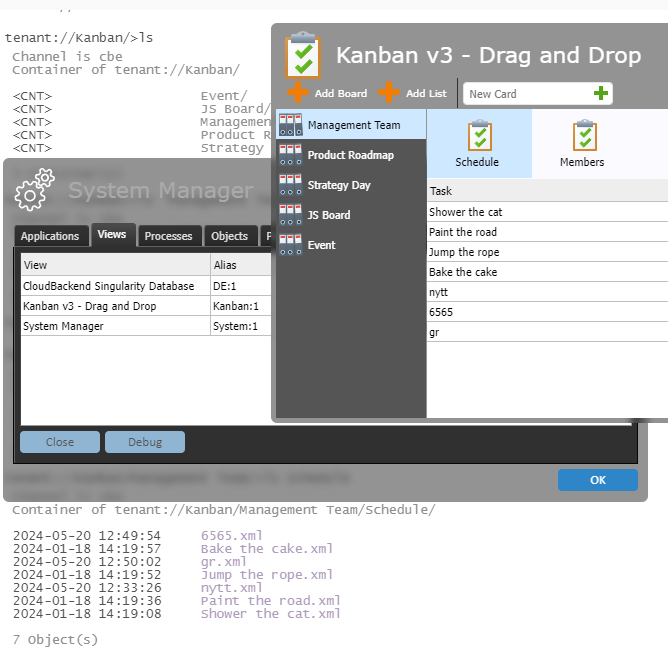
The application lives in the database, next to its data.
Source is versioned and ACL-protected like any other object. Build, run and debug in the same window — or in VS Code, synced to your account.
XMLPad
Browser editor with syntax highlighting, live validation and one-click XPath. Run the app from the editor.
VS Code extension
IntelliSense and cloud source sync for teams who prefer a local editor.
Icons & themes
A built-in icon library and dark, light, coloured and custom themes that restyle an app without touching it.
The assistant already knows the whole documentation.
Describe what you want and get a view, a process and the binding. Point it at your own project with Set AI context. A complete app is 30–85 KB, small enough for a model to hold in full.
You: List tenant://Invoices with name and amount, sorted by due date,
and let the Finance group add one.
Assistant: Here is a view with a grid bound to
tenant://Invoices, a process that binds it on Loaded, and the
ACL line giving Finance write access…
Illustrative. The assistant runs inside the console and requires login.
Declare the view. Bind it. The database does the rest.
The documented example, exactly as shipped: eleven lines of view, seven lines of process, one running window.
<view name="aw02" title="aw2" icon="icon://balloons">
  <panel name="MainPanel" type="rows">
    <label>My Application Library</label>
    <grid name="appsGrid">
      <!-- Teach grid how to interpret the data it is bound to -->
      <row match="db:object">
        <column name="subjectCol" match="@name" display="substring-before(.,'.xml')" label="Name" filter="true" width="140"/>
        <column name="dateCol" match="@updated" display="." label="Updated (UTC)" filter="true" width="140"/>
      </row>
    </grid>
  </panel>
</view>
<process name="aw2_process">
  <trigger view="aw2" event="Loaded" step="init"/>
  <step id="init">
    <operation name="bind" value="home://Applications">
      <component view="aw2" name="appsGrid"/>
    </operation>
  </step>
</process>

<!-- bind = the fetch, the cache, the subscription,
     the re-render and the error path -->
<view name="aw01" title="aw apps list" icon="icon://rocket">
  <panel name="MainPanel" type="rows">
    <label>My Application Library</label>
  </panel>
</view>

<!-- a moveable window with a title and a label;
     everything else is components you add -->
| Name ▲ | Updated (UTC) |
|---|---|
| Calendar | 2026-08-24T09:37:11Z |
| Contacts | 2026-08-21T11:20:22Z |
| Expenses | 2026-08-26T12:36:36Z |
| 2026-08-12T13:04:16Z | |
| Notes | 2026-08-19T13:49:28Z |
| Tasks | 2026-08-18T08:12:59Z |
The running result. Click a column label and the rows sort; logic runs client-side, so the app keeps working when intermittently connected.
The same data model in a Linux daemon, an Android phone and a browser tab.
C++ is the core; Java and Android are bindings of it; Swift and Objective-C cover iOS and macOS. Python is in development.
String fileName = "IMG02025.jpg";
String dirPath  = "pictures/";
try {
  MyUploadDelegate delegate = new MyUploadDelegate();
  container.upload(fileName, dirPath, delegate);
  returnObject = delegate.waitForRsp();
}
catch( RuntimeException e ) {
   System.out.println("Warning:");
   e.printStackTrace();
};
return returnObject;
std::string fileName = "IMG02025.jpg";
std::string dirPath  = "pictures/";
auto uploadDelegate = std::make_shared<UploadDelegate>();
newContainer.upload(fileName, dirPath, uploadDelegate);
uploadDelegate->waitForRsp();
if( uploadDelegate->errorInfo ) {
  std::cout << "errorInfo = " << uploadDelegate->errorInfo << std::endl;
  return 1;
}
cbe::Object newObject = uploadDelegate->object;
String fileName = "IMG02025.jpg";
String dirPath  = "/DCIM/Camera/";
try {
  MyUploadDelegate delegate = new MyUploadDelegate();
  container.upload(fileName, dirPath, delegate);
  returnObject = delegate.waitForRsp();
}
catch( RuntimeException e ) {
   System.out.println("Warning:");
   e.printStackTrace();
};
return returnObject;
-(CBEObject*) upload:(NSString*)name
              length:(uint64_t) length
                data:(NSData*) data
            delegate:(id<UploadDelegatePtr>) delegate;
Five stages on a board, and a public URL at the end.
Each card carries a version and a VERIFIED or UNCHECKED badge. A deployed app gets its URL, a login page and its certificate.
My Projects
private deploymentsUNCHECKED
Development
test deploys, public or privateUNCHECKED
Shared Projects
public deploymentsUNCHECKED
Staging
verified versions, frozen to testUNCHECKED
Production
verified versions, liveUNCHECKED
No repository, no build pipeline, no container registry, no separate hosting bill. Deployment tutorial
Third-party API keys never reach the client.
Calls to an LLM, a payment provider or a mapping API go through a proxy that keeps the secret in a
keyring, referenced as ${proxyName_key}.
Devices and services write straight into a container.
curl --request POST \
  --header 'Authorization: Bearer API-KEY-SECRET' \
  --header 'Content-Type: text/xml' \
  --data "<newsfeed>Sunshine in $(hostname)</newsfeed>" \
  https://api.cloudbackend.com/v1/hook/{tenant}/{webhook}/
A complete, deployed, multi-user CRM is about 85 KB of source.
Read from the platform's own object store on 26 August 2026. No build step, no bundler, no package manager — 85 KB against an entire toolchain.
| Deployed application | What it is | Files | Source |
|---|---|---|---|
| SimpleCRM | Companies, contacts, deals, activities and users | 9 | ≈ 85 KB |
| Motors | Car marketplace — browse, listings and payment | 10 | ≈ 32 KB |
| Restaurant | Restaurant application | 5 | ≈ 25 KB |
| Weather | Weather application | 6 | ≈ 24 KB |
Why it is small: the binding replaces the plumbing, permissions are data, and there is no API tier. The shared datatype library (≈63 KB) is counted separately; an AppStore listing (≈400 bytes) is a manifest, not the app.