

One database. Every backend job.
Postgres for rows, S3 for files, Redis for cache, a search index, an auth service: that stack is five products doing one database's job. Here it is one namespace, one query language, one permission model. This page shows how.
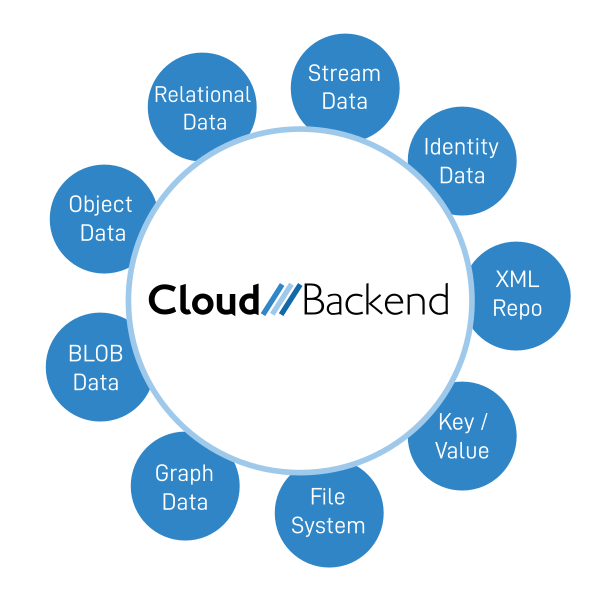
One data model does the work of five services.
A container is a table or a folder, an object is a row, key/values are columns, streams are files. One namespace, one query language, one permission model — so there is nothing to integrate.
Relational
Container as table, object as row, key/values as columns. Every row can carry its own ACL.
Hierarchy
Containers inside containers, as deep as you need, or groups and sub-groups with their own databases.
Key/value
Indexed metadata on any object: an invoice number, a due date, a mail subject — anything you want back fast.
Files & streams
Binary payloads attached to objects, up to 2 GB each. Mount the whole database as a drive over WebDAV.
XML repository
Native XML objects with XPath and XSLT. Results come back as XML, so the database is navigable as XML.
Identity & stream
Users, devices and backend APIs are identities with their own databases. Containers can notify listeners like a queue.
Fourteen words. That is the whole model.
A tenant is one SaaS business. An identity is a member of it — a user, a sensor or an API — with its own private database. Groups carry their own database; a role is a granted right.
| Term | What it is |
|---|---|
Database |
A collection of containers and/or objects. |
Container |
A collection of containers and/or objects. Behaves like a table or a folder. |
Object |
Similar to a row in a table; keeps key/value data and streams. |
Stream |
A binary or document payload attached to an object. Max 2 GB each. |
Key/Value |
Indexed metadata on objects or containers. |
Datatype |
Controls object behaviour, or defines the schema a container will accept. |
ACL |
The access control list that governs permissions on any item. |
Sharing |
Grant named identities or groups access to an item. |
Publish / Subscribe |
Expose a view of an item without revealing its ID; others subscribe to it. |
Webhook |
An inbound HTTPS endpoint that writes external data straight into a container. |
The tenant cannot read what it cannot reach.
The tenant — the SaaS business — has no access into an identity's private database. It cannot harvest what it cannot reach. That is a fact of the schema, not a promise.
tenant://
The shared database: common data, settings, the app itself, published price plans.
home://
Every identity's private database. The tenant cannot read into it; the identity shares out of it with an ACL.
local://
A browser-local database for scratch data that never crosses the network.
- Per-user privacy you never implement, test or audit in code
- Sharing is explicit and recorded in the ACL
- Group databases for team and organisation data
- Right to erasure as a button in the account panel
Authorization is a number on the data, not a policy you write.
Every container and object carries an access control list, inherited from its parent unless it has its own. Sixteen combinations, one line in the CLI. No authorization layer to write, and none to test.
Query, search, join and export — from the same line.
The equivalent of SQL, with full-text indexing built in. Joins chain across containers, so the "you can't join a document store" objection does not apply.
tenant://> query . -s "name(40), updated" -w "+name:invoice +pubyear:2024 +pubmonth:7" -l 500

tenant://> query recipes -s updated,title
+----------+-------+
| Updated  | Title |
+----------+-------+
| 10:55:37 | Miso  |
| 11:05:25 | Sushi |
+----------+-------+

tenant://> query . -s "Container,**" -l 500 -e home://exports/july.csv
+ and
- and not
: string match, * wildcard
> < numeric ranges
pubyear pubmonth computed dates
-e export CSV
Seventy-plus CLI commands, in the browser and on Linux. CLI reference
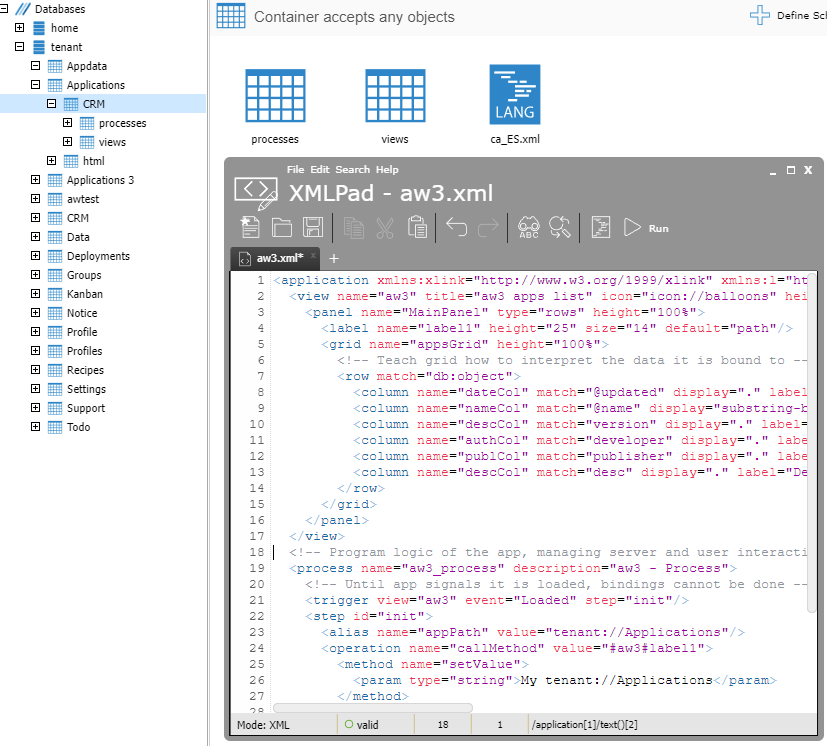
The app and the data speak the same language.
Applications and data are both XML. So one transaction manager syncs both, and the XPath that queries your data also drives your UI bindings.
- XPath 1.0, XSLT 1.0, XLink and XPointer
- Schema per container when you want one, none when you don't
- Metadata extracted automatically from photos, audio and office files
Every surface uses the same identity and the same permissions.
SDKs
Web UI for declarative apps; C++, Java, Android, Swift and Objective-C for everything else.
CLI
Inspect, query, set ACLs and listen to channels — in the browser and on Ubuntu Linux.
Web console
Explorer, identities, roles, deployments, statistics and support — itself built on the database.
Webhooks
Devices and services post XML, JSON, CSV, text or binary payloads straight into a container.
API proxy
Call third-party APIs through an intermediary that keeps the secret in a keyring.
WebDAV
Mount the database as a drive for bulk import and non-developer workflows.